Pinscreen Animation
1933, Alexandre Alexeieff and Claire Parker's technique
Prompt
Apply a Pinscreen Animation effect in black, white, and finely graduated gray. Build forms from dense pinprick textures and tiny elongated side-lit shadows, creating velvety dark masses, luminous open areas, and soft engraving-like contours on a matte white board. Keep the original subject and composition.
Identify
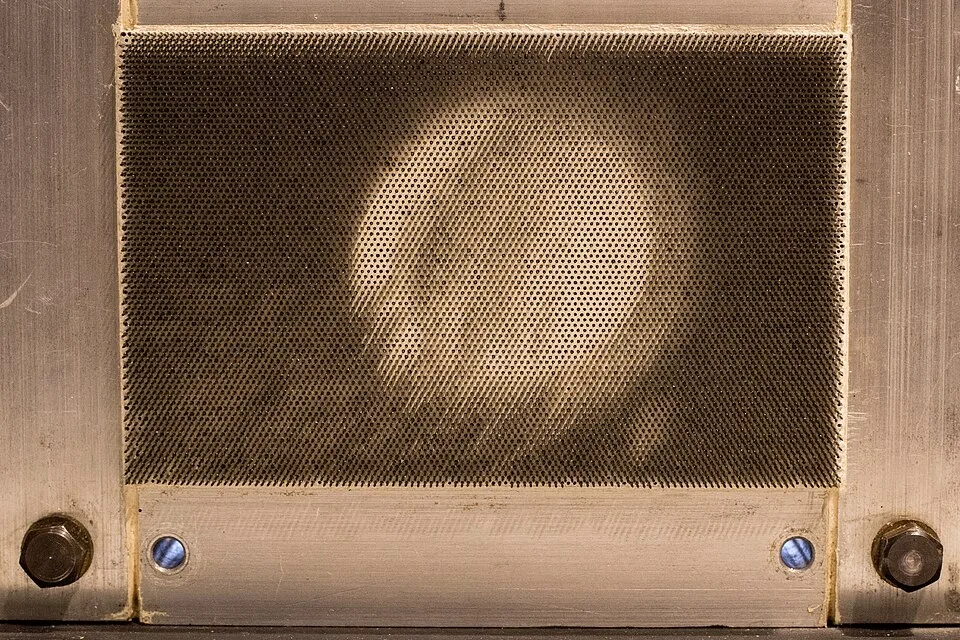
You see a textured, shifting image in black, white, and gray. The picture looks like a moving engraving or a fluid, shadowed drawing.
Principle
Thousands of sliding pins are pushed into a white board and lit from the side. Extended pins cast long dark shadows, while pushed-in pins leave the white board bright.
Example
Alexandre Alexeieff and Claire Parker: Night on Bald Mountain, 1933.
Try it out
Shine a flashlight across a hairbrush or a bed of nails, noticing how shadows change as you tilt it.
Background
In 1933, Alexandre Alexeieff and Claire Parker invented the pinscreen to bring engraving techniques1 into film. They built a large vertical board pierced by over a million tiny headless pins. Animators used special tools to push the pins in or pull them out. A light source placed at a sharp angle cast shadows from every protruding pin. By altering how far the pins stuck out, they created smooth gradients of gray. They took a photo of the board, changed the pins slightly, and took another photo. This stop-motion process2 was incredibly slow. It produced a uniquely haunting, dreamlike texture that no other medium could match.
Distinction
Pinscreen animation relies on physical shadows from movable pins to create tone. Sand animation uses loose grains manipulated on a glowing lightbox to form high-contrast silhouettes.
Aftermath
It proves that complex, fluid shading in animation can be achieved entirely through manipulating physical shadows.
Further examples · 7 images
_(cropped).jpg)

.jpg)


.jpg)
Question
Why do fully extended pins create a black area on the screen?
Show possible answer +Hide answer −
Extended pins cast long shadows that overlap and cover the white background. This blocks the light and makes the area look entirely black.