Apply a Split Screen treatment by arranging two synchronized versions of the original view in adjacent panels with a clean vertical divider. Introduce modest differences in exposure and color temperature, with crisp rectangular boundaries and no blending between views. Within each panel, keep the original subject and composition.
Show the same action from two contradictory perspectives2.
Background
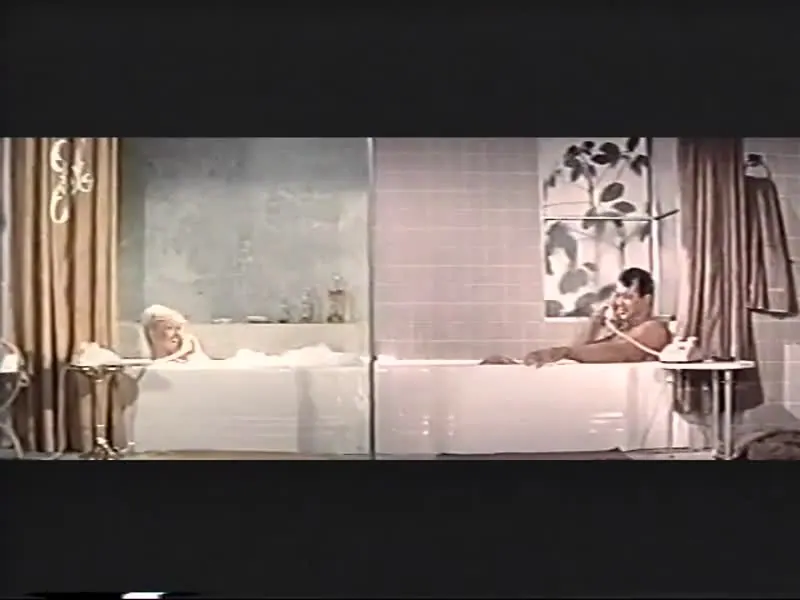
Split screen has been used since early film experiments to create multiple settings and subjective comparisons. Abel Gance's Napoléon made monumental multiple images famous in 1927. Columbia also shows the telephone montage of Pillow Talk and the quadruple image of Timecode. The effect differs from parallel editing: The audience sees the views simultaneously, rather than switching between individual, full-screen shots.
Distinction
Images visible at the same time do not necessarily represent events recorded simultaneously. The division can suggest proximity, make comparisons, or emphasize differences.
Aftermath
Simultaneity is adesign statement, not automatically documentary evidence.
Further examples · 7 images
02Split-screen rame from Free Wheelin' (1976). No 1Three distinct frames show different perspectives of vans and people in Free Wheelin'. This composition allows the audience to observe various character interactions and vehicle movements within a single shared image area.75Portlewes · CC0 · Wikimedia Commons03DayHudson3PillowTalkA dark horizontal division separates a man and a woman in different rooms. It illustrates how the technique can visually connect characters in separate locations during a simultaneous event like a phone call.Universal International · Public domain · Wikimedia Commons04DayHudsonPillowTalkTwo vertical panels display characters talking on the telephone in the film Pillow Talk. The side-by-side arrangement provides a subjective comparison between the two participants while maintaining their spatial separation.Universal International · Public domain · Wikimedia Commons05AllenHudsonDayPillowTalkThree triangular and rectangular partitions show three characters on the phone at once. This complex spatial composition allows for a multifaceted narrative view that goes beyond simple parallel editing.Universal International · Public domain · Wikimedia Commons06Split-screen 4-player multiplayer in SuperTuxKart (2017, 0.9.3)Four quadrants display the individual perspectives of players in a kart racing game. This is a functional application of the effect, letting multiple users see their personal progress on one screen.QwertyChouskie · CC BY-SA 4.0 · Wikimedia Commons07Split Screen of President Richard Nixon and the Apollo XI Astronauts on a White House Television - DPLA - f5950af302604b93e327e7c3eeb817d6A television display shows two separate video feeds side-by-side in a single frame. This depicts the telephone-style conversation layout where two remote participants appear to share the same visual space.President (1969-1974 : Nixon). White House Photo Office. 1969-1974, General Services Administration. National Archives a · Public domain · Wikimedia Commons
Question
What distinguishes split screen from parallel editing?
._No_1.png)


.png)
