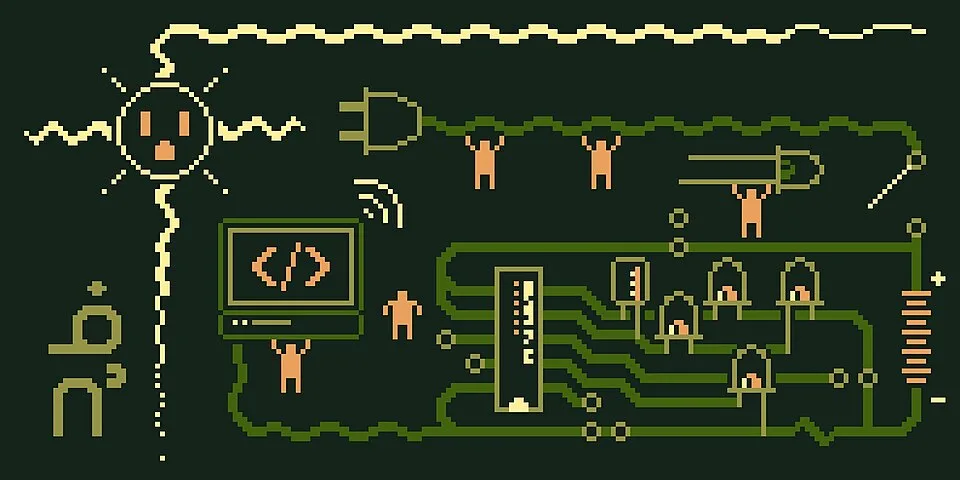
Pixel Circuit Playground. A computer, circuit paths, logic gates, and tiny figures form a playful technological scene on dark green.Nodin Cutfeet · CC BY-SA 4.0 · via Wikimedia CommonsView source ↗
Prompt
Transform this image into Pixel Art using a visibly low-resolution square grid, a restricted color palette, and deliberate clusters of solid pixels. Create sharp stair-step contours, simplified shading, and selective checkerboard dithering, with no smooth gradients, blurred edges, or antialiasing. Keep the original subject and composition.
You see [blocky, grid-based images]made of [distinct square dots]. The artwork has sharp edges, stark colors, and visible stair-step lines.
Principle
Artists manually color individual pixels1on alow-resolution grid to build recognizable shapes. Ahighly [restricted color palette]forces strategic color placement.
Example
Shigeru Miyamoto: Super Mario Bros. character sprite, 1985.
Try it out
Zoom far into asmall digital icon until you can count the individual square colored blocks making up its curved edges.
Background
In the 1970s and 1980s, computer memory was extremely expensive and severely limited. Game developers could not store high-resolution images or complex curved shapes. Instead, they built small digital characters, called sprites2, on tiny grids. Artists had to place every single pixel by hand to ensure clarity on blurry television screens. They used specific tricks like dithering3, mixing two solid colors in acheckerboard pattern to simulate athird shade. As technology improved, this technical necessity evolved into adeliberate, nostalgic artistic style still popular today.
Distinction
Pixel art requires manual, intentional placement of every individual dot. In contrast, digital noise or low-resolution photographs randomly generate blocky artifacts.
Aftermath
It reveals how extreme technical limits often inspire highly creative visual abstraction.
Further examples · 8 images
02Potted Plant in PixelsA leafy green plant rises from a red pot inside a pale blue geometric border. Large square pixels, stair-step silhouettes, and discrete color bands define both its shapes and shading.BiFr0st12 · CC BY-SA 4.0 · Wikimedia Commons03Muted Pixel City StreetA muted purple streetscape contains balconies, sale signs, a shopfront, and a small orange character. Consistent pixel-scale details, stepped diagonals, and a restrained palette establish a carefully constructed pixel-art environment.AnubiArts · CC BY-SA 4.0 · Wikimedia Commons04Green Pixel CreatureA green creature with square eyes, pink cheeks, and a heavy black outline stands against pale green. Its coarse grid, stepped silhouette, and economical blocks of shading clearly exhibit pixel-art construction.CutieePuppy12 · CC BY-SA 4.0 · Wikimedia Commons05Repeating Blue-Haired Pixel SpritesRows of small blue-haired figures repeat across a black field, with square-edged faces, clothing, and limbs. Their visible pixel grids, stepped outlines, and compact color palettes clearly demonstrate sprite-based pixel art.Kurt Kaiser · CC0 · Wikimedia Commons06Rainbow Pixel FormsTwo angular rainbow forms float against a black background, each assembled from brightly colored squares. Their exposed square units and stepped contours clearly demonstrate image-making on a coarse pixel grid.Trougnouf · CC0 · Wikimedia Commons07Dithered Portrait in Bright ColorsA bespectacled man in a suit appears in vivid yellow, pink, cyan, and purple against black. Stepped outlines and patterned pixel dithering build the portrait from a tightly restricted palette.Original: Unknown authorUnknown author; New version: OmegaFallon · CC0 · Wikimedia Commons08Pixel Graphics and Decorative LetteringA collage combines colorful decorative lettering, shaded fantasy imagery, a small landscape, and a keyboard diagram. The illustrated sections display stepped contours and carefully patterned pixel shading characteristic of detailed pixel art.Dpla-fr · CC BY-SA 4.0 · Wikimedia Commons
Question
Why did early pixel artists use so few colors?
Show possible answer +Hide answer −
Early computer hardware had very little memory to store color data. Systems could often only display eight or sixteen colors at once.