Normal Mapping
Normal mapping. 1998: Appearance-Preserving Simplification; later a gaming standard.
Prompt
Apply a Normal Mapping effect by giving existing surfaces fine simulated bumps, pores, grooves, and embossed details that respond consistently to directional light. Use tiny highlight and shadow variations to suggest relief while keeping silhouettes, surface positions, and outer edges completely unchanged. Keep the original subject and composition.
Identify
Fine reliefs react to light, even though the basic shape remains simple.
Principle
An RGB1 card changes the direction of the lighting normals2.
Example
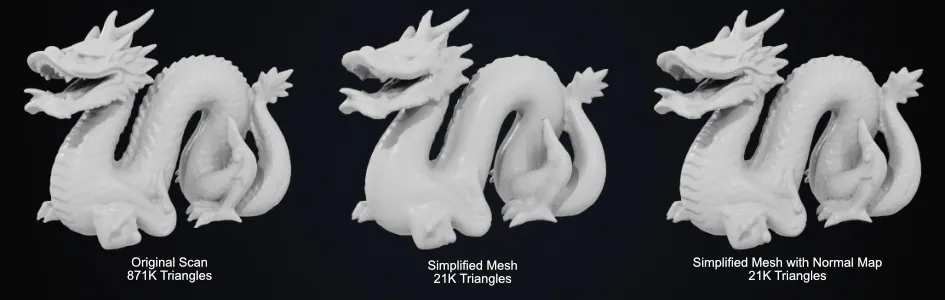
Blender: Normal map comparison.
Try it out
Rotate the light and then check the silhouette.
Background
Appearance-Preserving Simplification by Cohen, Olano, and Manocha demonstrated in 1998 how color and normal textures can preserve details in simplified geometry. The practical result is a high degree of visible detail on comparatively simple models. Blender explains RGB-coded normals that must match the chosen coordinate space. The current documentation image illustrates the principle; it is not included as an image from the paper.
Distinction
A normal map does not typically model a new silhouette. Its RGB values encode directions, not ordinary surface colors; the texture requires appropriate data settings.
Aftermath
Geometric complexity and perceived surface detail can be partially separated.
Further examples · 7 images


.png)
Question
Why does a normally mapped relief often remain flat at the outer edge?
Show possible answer +Hide answer −
It changes the direction of illumination on the surface. The underlying points, and therefore the silhouette, remain unchanged.