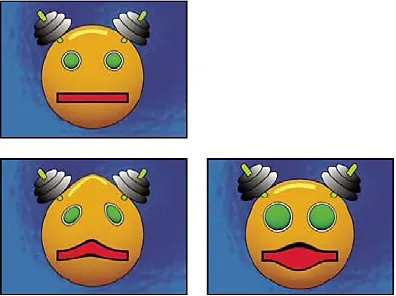
Liquify: Original and variants from the Adobe documentation.Adobe, official technical demonstration.View source ↗
Prompt
Apply a liquify effect with localized pushed contours, gently inflated forms, pinched details, and small swirling distortions. Stretch surrounding textures continuously along each deformation, maintaining smooth color transitions and coherent surface detail without pixel fragmentation. Keep defining features recognizable and leave the overall framing unchanged. Keep the original subject and composition.
The Liquify tool makes spatial distortion directly controllable by hand. Adobe documents pushing, pulling, twisting, contracting, and inflating, as well as masks for freezing unchanged regions. The 2000s serve as amilestone in its retouching and filter culture, without claiming exclusive invention for these forms of image distortion. The effect can subtly correct or intentionally create an elastic, impossible image.
Distinction
Liquify is alocal distortion and not an automatic identification of realistic body shapes. Adjacent lines often reveal where the image has been shifted.
Aftermath
Deformation limits and background reactions are just as important as the target region.
Further examples · 7 images
02296 vilnius A Warm Day (16845067299)A street lamp and building facade appear warped with wavy, elastic contours. It demonstrates the intentional use of Liquify-style spatial distortion to create an impossible, fluid aesthetic from a realistic architectural photograph.Brian Toward from London, United Kingdom · Public domain · Wikimedia Commons03Image warping exampleA portrait displays extreme local spatial distortion of the eyes and nose. This demonstrates the liquify technique of pushing and pulling pixels to deform facial features while keeping other areas relatively stable.Salemterrano · CC BY-SA 3.0 · Wikimedia Commons04Liquify, applied to “Manene Tradisi Ganti Baju Mayat di Tana Toraja”A person stands beside a mummified figure with a floral headpiece. The torso of the mummified figure and the back of the person are localy stretched, appearing melted or pulled.RaiyaniM (photo); processed for the Atlas · CC BY-SA 4.0 · Wikimedia Commons05Liquify, applied to “Kreta (GR), Rethymno, Küchenutensilien -- 2023 -- 8185”Wooden kitchen utensils are arranged in a pile. The grain and edges of the central spatulas show a distinct swirled and wave-like deformation from a brush stroke.Dietmar Rabich (photo); processed for the Atlas · CC BY-SA 4.0 · Wikimedia Commons06Liquify, applied to “Matryoshka from Hungary”Four Matryoshka dolls are displayed against a white background. The central, larger dolls feature local bulging and pinches, warping their painted floral patterns and solid forms.Wilfredor (photo); processed for the Atlas · CC0 · Wikimedia Commons07Liquify, applied to “Comercio en la plaza del 9 de abril de 1947, Tánger, Marruecos, 2015-12-11, DD 7”A merchant stands inside a small shop filled with spices and shelves. A horizontal smear across the center of the image creates a liquid ripple through the signs and shelves.Diego Delso (photo); processed for the Atlas · CC BY-SA 4.0 · Wikimedia Commons
Question
Which area do you check first to detect a deformation?
Show possible answer +Hide answer −
Straight background edges near the processed region. They are often bent along with the image and reveal the local distortion field.
.jpg)


,_Rethymno,_K%C3%BCchenutensilien_--_2023_--_8185.jpg)

