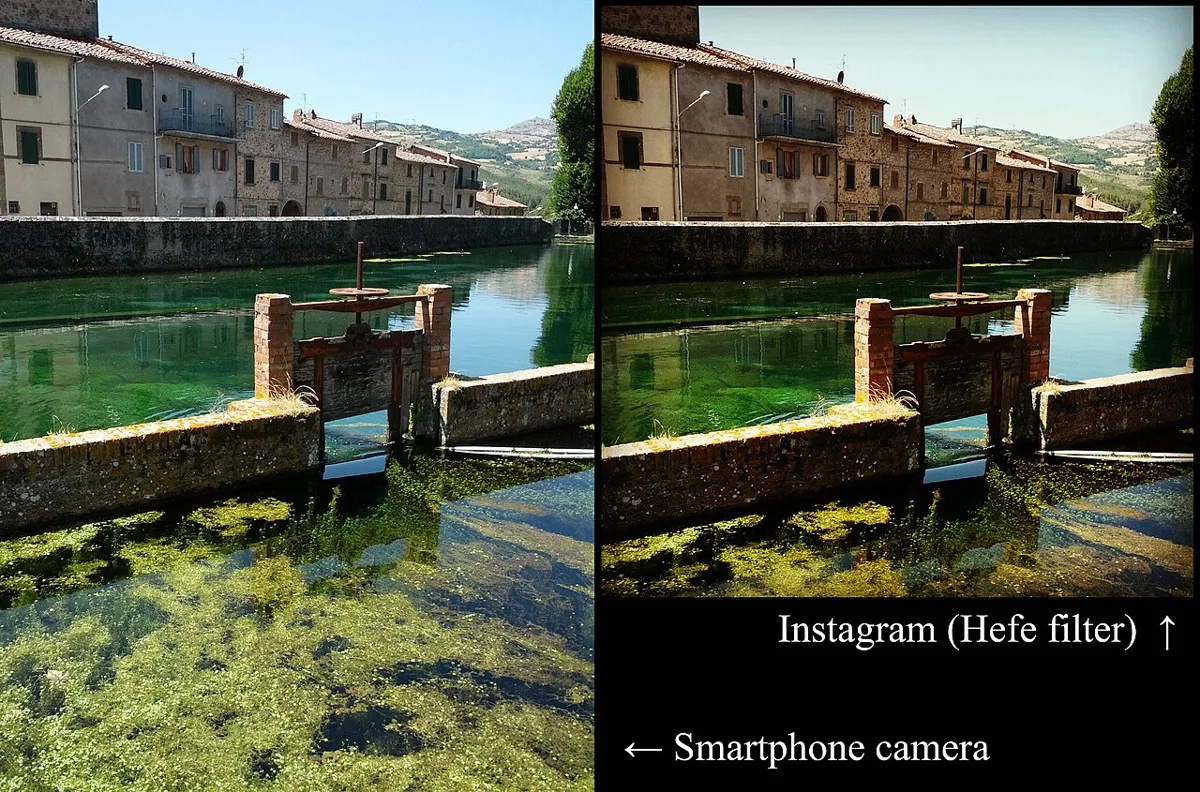
Riverside Scene Before and After Hefe. Two views of a riverside scene compare a smartphone photograph with an Instagram Hefe version.sailko · CC BY-SA 3.0 · via Wikimedia CommonsView source ↗
Prompt
Apply an early 2010s vintage photo filter effect with faded charcoal blacks, warm amber midtones, slightly muted blues, darkened corners, and a thin pale border. Add delicate simulated grain and gently compressed highlights for an aged digital snapshot appearance. Keep the original subject and composition.
Many early presets show [faded blacks], [warm color casts], and darkened corners. Some add pale borders or strong contrast, suggesting aged snapshots.
Principle
Digital presets remap pixel colors and brightness through [tone curves1]and color adjustments. Added vignettes2and borders imitate photographic artifacts without changing camera exposure or chemically developing film.
Example
Kevin Systrom: Photograph of adog in Mexico, 2010.
Try it out
Apply avintage preset to adaylight photograph, then compare its darkest shadows, white surfaces, and corners with the original.
Background
Instagram launched in 2010 with named filters that made repeatable photographic styles available through asimple selection. Early looks borrowed from instant prints, inexpensive cameras, and color photographs altered by age or processing. These were digital interpretations, not faithful simulations of one film stock3. Tone curves could lift the darkest values, while separate color adjustments shifted shadows and highlights. Vignettes darkened the edges, and optional borders suggested physical prints. Combined with the platform’s original square format, these treatments helped establish arecognizable visual language for everyday mobile photography.
Distinction
Unlike chemical cross-processing, these filters alter digital image values rather than develop film in chemistry intended for another film type. Unlike simple sepia toning, many presets preserve several colors while changing their relationships.
Aftermath
The technique shows how repeatable color and tonal choices can make new photographs suggest an imagined photographic past.
Further examples · 8 images
02Fortress With X-Pro II FilterStacked photographs show a stone fortress before and after application of Instagram's X-Pro II filter. The lower image demonstrates stronger contrast, shifted sky color, and pronounced corner shading.Ottonecancelli · CC BY-SA 4.0 · Wikimedia Commons03Street Sign Filter Comparison GridSixteen versions of a hanging street sign form a grid of contrasting photographic treatments. Repeated subject matter makes the presets' color shifts, faded shadows, monochrome conversions, and decorative borders directly visible.Ragesoss · CC BY-SA 3.0 · Wikimedia Commons04Latte Across Named Instagram PresetsA grid repeats a cup of latte beneath names including Normal, Kelvin, Hudson, and Earlybird. The comparison clearly demonstrates how Instagram presets alter color balance, contrast, shadow tone, and framing without changing the photographed subject.Jzollman Jessica Zollman · CC BY-SA 3.0 · Wikimedia Commons05Nighttime Event With Distressed Snapshot BorderSpectators watch a smoky nighttime vehicle event within a pale, distressed frame. Muted warm colors, softened blacks, and simulated edge wear give the digital photograph the aged-snapshot appearance associated with early Instagram presets.Loozrboy from Toronto, Canada · CC BY-SA 2.0 · Wikimedia Commons06Camera Body Paint With Retro FilterA seated figure bears camera-inspired body paint against a blue brick wall, enclosed by a simulated film frame. Yellowed highlights, blue-purple shadows, and artificial film-edge markings visibly demonstrate a retro digital filter treatment beyond the painted Instagram motif.Exey Panteleev · CC BY 2.0 · Wikimedia Commons07Cat Portrait With Vintage Filter BorderA black-and-white cat rests its paws on a ledge inside an irregular dark frame with a pale outer margin. The warm cast, subdued shadow detail, corner darkening, and artificial border visibly evoke the vintage snapshot styling of early Instagram filters.Susanne Nilsson · CC BY-SA 2.0 · Wikimedia Commons08Cat Silhouette with Retro Filter BorderA cat sits silhouetted against a window, surrounded by violet-tinted shadows and an irregular black-and-white snapshot border. The exaggerated contrast, shifted colors, and simulated print edging clearly demonstrate the retro styling associated with early Instagram filters.Just Shireen · CC BY 2.0 · Wikimedia Commons
Question
Why do faded blacks make a digital photograph look older?
Show possible answer +Hide answer −
Raising the darkest output values makes black areas appear gray, reducing their depth. This resembles some faded prints, although real aging varies widely.


.jpg)

.jpg)
.jpg)