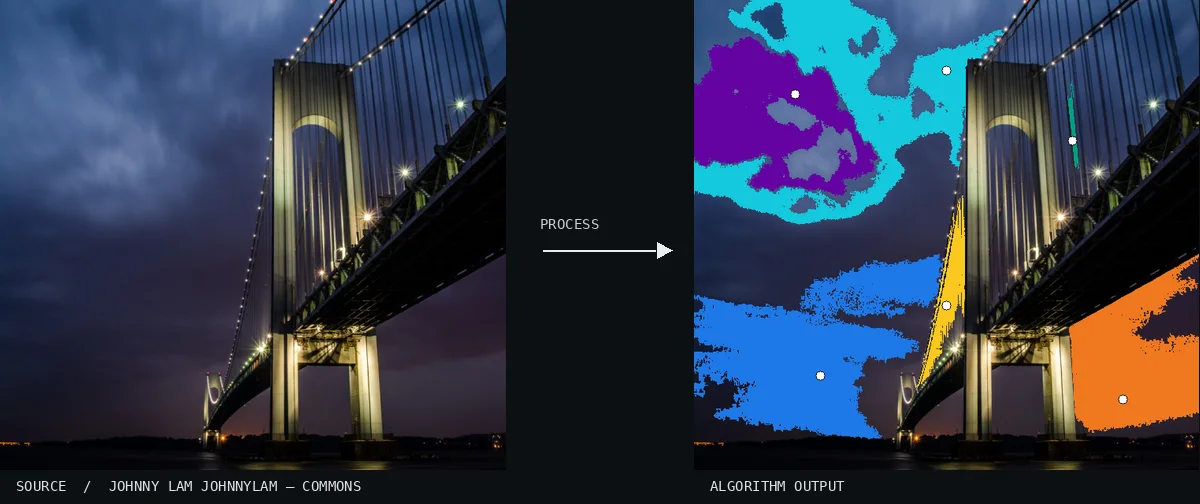
Atlas demonstration: the free source photo and the computed Flood Fill. A suspension bridge is captured at night from a low angle against a dark, cloudy sky. Massive, irregular blobs of cyan, orange, and blue illustrate where the process expanded through the uniform tones of the sky and bridge structure.Image: Johnny Lam johnnylam · CC0 (via Wikimedia Commons), processed for the AtlasView source ↗
Prompt
Apply a Flood Fill effect, replacing connected areas of similar color with large, perfectly uniform color blocks. Let fills stop at existing contrast boundaries, retaining irregular silhouettes and enclosed pockets. Use a reduced palette drawn from the photograph, without gradients, brush texture, or added outlines. Keep the original subject and composition.
You see large, [uniform blocks of asingle color]replacing areas of similar pixels in the original image.
Principle
The algorithm starts at a[chosen seed pixel1]and checks [neighboring pixels]. It changes their color if they match within aset tolerance2.
Try it out
Adjust the color tolerance to make the filled region expand further or shrink.
Classification
Calculated image processing result.
Further examples · 9 images
02Flood Fill, applied to “Ski lift people on snow mountains (Unsplash)”A scenic view from a ski lift overlooks a vast, snow-covered mountain range under a bright sky. The blue and cyan floods demonstrate how the algorithm expands across contiguous regions of similar light values in the snow and sky.Urban Sanden urre (photo); processed for the Atlas · CC0 · Wikimedia Commons03Flood Fill, applied to “Interior vintage car. (Unsplash)”A vintage radio rests atop a magazine on a leather surface, evoking a nostalgic atmosphere. Vibrant blocks of orange and teal illustrate how the process isolates distinct tonal planes of the surrounding environment.Clem Onojeghuo clemono2 (photo); processed for the Atlas · CC0 · Wikimedia Commons04Flood Fill, applied to “Two people at sunset (Unsplash)”Two figures stand at the edge of a tide pool during a sunset that reflects colors across the water. Horizontal bands of purple and yellow define the varied gradient levels of the sky and its mirror image below.Sebastien Gabriel sgabriel (photo); processed for the Atlas · CC0 · Wikimedia Commons05Flood Fill, applied to “Slow Snap (Unsplash)”A turtle moves slowly across a sandy surface, its textured shell standing out against the blurred background. A large orange fill creates a flat geometric plane across the foreground sand, following the specific path of the light.Nick Abrams nbabrams (photo); processed for the Atlas · CC0 · Wikimedia Commons06Flood Fill, applied to “Lush Mountain Landscape (Unsplash)”A scenic mountain valley features a winding hiking trail cut into steep, rocky cliffs. Several small regions of the landscape have been replaced by flat, vibrant purple and teal shapes where the algorithm encountered similar color values.Fineas Anton fineas_anton (photo); processed for the Atlas · CC0 · Wikimedia Commons07Flood Fill, applied to “Pretzel pole (Unsplash)”Seeded pretzels covered in salt hang from a wooden rod in a close-up shot with a blurred background. Distinct blue, green, and orange geometric fills appear in the negative space between the pretzels and the background elements.Kristina Balić daisyk9 (photo); processed for the Atlas · CC0 · Wikimedia Commons08Flood Fill, applied to “Bridge Structures (Unsplash)”The intricate cable work and stone arch of the Brooklyn Bridge dominate the composition. Vertical columns of blue and yellow pixels show where the algorithm traveled through the shadows and textures of the bridge’s stone tower.Anthony DELANOIX anthonydelanoix (photo); processed for the Atlas · CC0 · Wikimedia Commons09Flood Fill, applied to “Outdoor portrait (Unsplash)”A young woman with curly hair looks toward the camera while holding a smartphone in a crowded urban setting. A single cyan fill dominates the background, highlighting the boundaries where the person's silhouette interrupts the color spread.Anthony Ginsbrook aginsbrook (photo); processed for the Atlas · CC0 · Wikimedia Commons
.jpg)
.jpg)
.jpg)
.jpg)
.jpg)
.jpg)
.jpg)
.jpg)