1950s, Ray Harryhausen; demonstrated in 20 Million Miles to Earth, 1957.
Typeface · Trade Winds
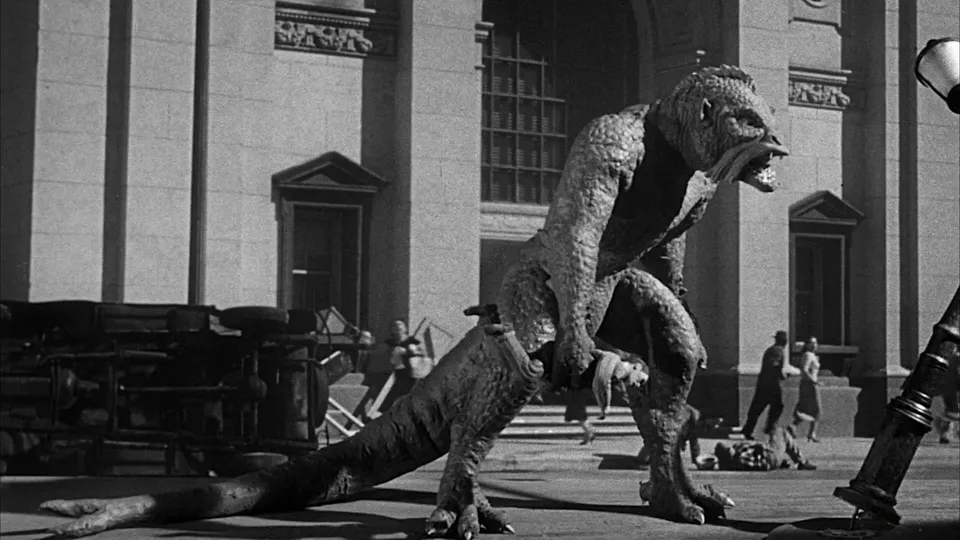
Ymir Among Fleeing City Crowds. A towering reptilian creature strides through a city street among fleeing people, overturned vehicles, and foreground wreckage.Columbia Pictures · Public domain · via Wikimedia CommonsView source ↗
Prompt
Apply a rear-projection stop-motion composite effect, rendering the main subject with tactile miniature textures, painted surfaces, and slightly rigid articulation. Give the photographic surroundings softer projected grain, faint matte-edge halos, and modest exposure mismatch, retaining existing foreground overlaps to integrate the model. Keep the original subject and composition.
[Stop-motion creatures]appear among live actors in photographed locations. Foreground scenery hides parts of their bodies, while slightly stepped movements distinguish them from surrounding action.
Principle
[Rear projection1]places filmed action behind an animated model, with both photographed frame by frame. [Complementary mattes2]reserve separate image areas for successive exposures, allowing foreground action to appear in front of the model.
Example
Ray Harryhausen: 20 Million Miles to Earth, 1957.
Try it out
Watch acreature pass behind scenery, pausing frequently; trace the boundary where the photographed foreground conceals the animated model.
Background
Harryhausen developed this approach to combine miniature creatures with filmed people and places without building complete miniature sets. He used it before Dynamation became apromotional name for The 7th Voyage of Sinbad in 1958. Aprojector advanced the live-action footage one frame at atime behind the model. The animator adjusted the model between camera exposures3. Amatte blocked the foreground area during this pass. After rewinding the camera film, acomplementary matte protected the recorded area while the missing foreground was exposed. This placed the creature between photographed background and foreground.
Distinction
Ordinary rear projection places performers or models in front of aprojected background. Dynamation adds split-screen masking and additional exposures so photographed foreground elements can also overlap the model.
Aftermath
Dynamation shows how carefully controlled overlap can make separately photographed subjects appear to occupy one continuous space.
Further examples · 11 images
02Ymir Towering Over a City StreetThe Ymir stands before a monumental building while people flee across the street around it. The animated creature and photographed human action share a convincing spatial setting, clearly illustrating Dynamation's integration of models and live action.Columbia Pictures · Public domain · Wikimedia Commons03Animated Combat Behind Foreground Street SceneryAn enormous elephant and the Ymir struggle in a city square behind a foreground car and silhouetted street furniture. The foreground elements overlap the animated animals while photographed architecture and distant people establish depth, making the layered Dynamation composite especially clear.Columbia Pictures · Public domain · Wikimedia Commons04Talos Above the Coastal InletThe bronze giant Talos towers above a coastal inlet, holding a ship between rocky shores. This shot from Jason and the Argonauts combines the animated giant with photographed water and landscape, exemplifying Dynamation's placement of miniature creatures within location footage.Columbia Pictures · CC0 · Wikimedia Commons05Jason Confronts the HydraA swordsman confronts a many-headed Hydra in a rocky cavern in Jason and the Argonauts. The stop-motion creature and live-action performer share a composite setting, clearly demonstrating Dynamation's integration of animated models with photographed action.Columbia Pictures · CC0 · Wikimedia Commons06Skeleton Battle Among the RuinsArmed skeletons attack live-action warriors among sunlit ruins in Jason and the Argonauts. The animated skeleton models are composited into the actors' combat choreography, providing a particularly clear example of Dynamation.Columbia Pictures · CC0 · Wikimedia Commons07Cyclops Confronting the Chained DragonA cyclops confronts a chained dragon in a rocky clearing from The 7th Voyage of Sinbad. The animated creatures are integrated into a photographed landscape in a genuine Dynamation sequence, although no live actor is visible in this frame.Columbia Pictures · Public domain · Wikimedia Commons08Ymir in the LaboratoryAn enormous Ymir lies restrained above laboratory personnel in 20 Million Miles to Earth. The animated miniature appears within a live-action laboratory, demonstrating the compositing approach that became known as Dynamation.Columbia Pictures · Public domain · Wikimedia Commons09Ymir Behind Cage BarsThe Ymir grips the bars of its transport cage against a wooded background in 20 Million Miles to Earth. This genuine Harryhausen effects shot uses the stop-motion and live-action integration subsequently promoted as Dynamation, with the cage enclosing and partially obscuring the creature.Columbia Pictures · Public domain · Wikimedia Commons10Chained Dragon Breathing FireA chained dragon breathes flame across a rocky chamber in The 7th Voyage of Sinbad. The shot features a genuine stop-motion creature from a Dynamation production, although this view emphasizes the model and fire rather than interaction with live actors.Columbia Pictures · Public domain · Wikimedia Commons11Cyclops Against the Island SkyA horned Cyclops towers against a blue sky and rocky island landscape in The 7th Voyage of Sinbad. This genuine Dynamation creature shot places an animated model within a photographed setting, though no live performer is visible in the crop.Columbia Pictures · Public domain · Wikimedia Commons
Question
Why does foreground scenery help sell the illusion?
Show possible answer +Hide answer −
It hides part of the model, giving astrong depth cue. The creature seems embedded in the location rather than placed before ascreen.
_Ymir_2.png)
_Ymir_vs._elephant_2.png)
_Talos_%26_the_Argus_corrrection_exposition.png)
_Hydra_fight_correction_exposition.png)
_Children_of_the_night,_correction_exposition_3.png)

_Ymir_examination.png)
_Ymir_cage_1.png)

