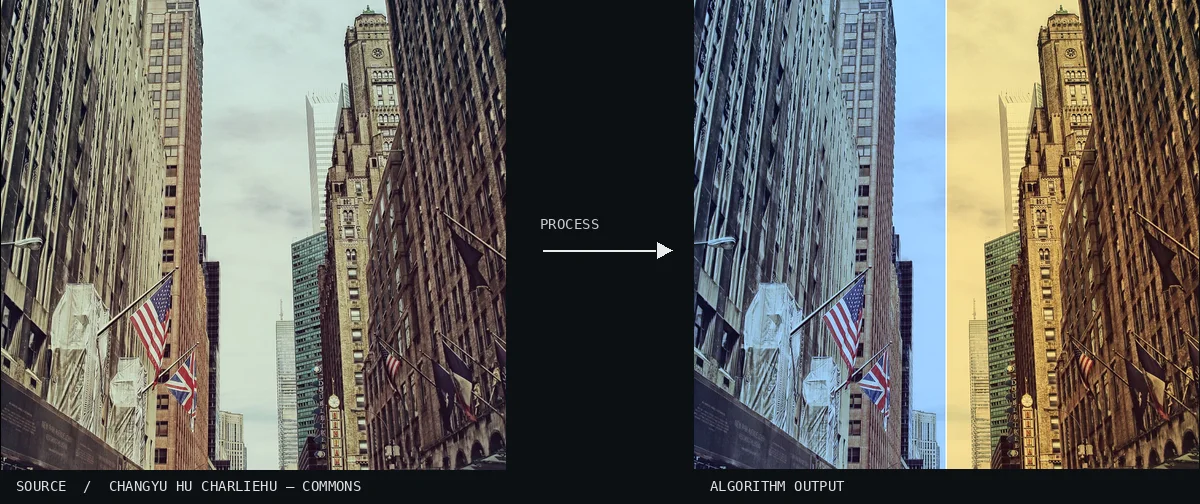
Atlas demonstration: the free source photo and the computed White Balance Shift. A split-view perspective of a dense city street lined with flags and towering skyscrapers. The left side is saturated with a cool blue cast, while the right side displays a contrasting warm amber glow.Image: Changyu Hu charliehu · CC0 (via Wikimedia Commons), processed for the AtlasView source ↗
Prompt
Apply a White Balance Shift effect, warming the entire photograph through stronger red and weaker blue relative to green. Give neutral surfaces an amber cast, highlights a creamy warmth, and shadows a restrained brown tint while preserving material texture and lighting direction. Keep the original subject and composition.
You see an image tinted with an overall [warm, amber glow]or acool, bluish cast.
Principle
The algorithm scales the red and blue [color channels1]relative to green. This compensates for the [color temperature2]of light sources.
Try it out
Shift the balance to see the photo change from acrisp icy blue to agolden afternoon tone.
Classification
Calculated image processing result.
Further examples · 9 images
02White Balance Shift, applied to “Gray forest (Unsplash)”Numerous tree trunks stand vertically in a dark forest setting. The left half of the composition is dominated by a deep cyan tint, whereas the right side is rendered in earthy, warm tones.Paul Gilmore paulgilmore_ (photo); processed for the Atlas · CC0 · Wikimedia Commons03White Balance Shift, applied to “Flowers 1 (Unsplash)”A vibrant bouquet of flowers sits on a table next to a glass of water. A sharp vertical division separates a pale blue color cast on the left from a sunny yellow wash on the right.Alexandra Gorn alexagorn (photo); processed for the Atlas · CC0 · Wikimedia Commons04White Balance Shift, applied to “Karen Child (Unsplash)”This close-up captures a child's face decorated with traditional light-colored paste. The image transition shows the white paste appearing blue-white on the left and golden-brown on the right.Capturing the human heart. zjtcpts (photo); processed for the Atlas · CC0 · Wikimedia Commons05White Balance Shift, applied to “Landscape Journey (Unsplash)”A photographer adjusts a camera mounted on a tripod in a natural outdoor environment. The color temperature shifts dramatically across the frame, moving from a cold, blue light to a warm, sepia-like finish.Federico Bottos landscapeplaces (photo); processed for the Atlas · CC0 · Wikimedia Commons06White Balance Shift, applied to “Child studying (Unsplash)”A young child is shown in a tight portrait while focused on a task. The left side of the frame exhibits a heavy blue tint, while the right side transitions into a natural, warm lighting state.Les Anderson lesanderson (photo); processed for the Atlas · CC0 · Wikimedia Commons07White Balance Shift, applied to “Vertical landscape (Unsplash)”A urban scene featuring snowy fire escapes frames a distant, illuminated skyscraper. The left side is saturated with a cold blue tint, while the right side displays a glowing amber warmth.Justin Bisson Beck justinbissonbeck (photo); processed for the Atlas · CC0 · Wikimedia Commons08White Balance Shift, applied to “Ottomon and interior design (Unsplash)”A flat-lay arrangement displays various photography and tech equipment on a wooden surface. A distinct vertical division separates a cool, desaturated blue environment from a rich, golden-brown warmth.Jeff Hopper jeffhopper (photo); processed for the Atlas · CC0 · Wikimedia Commons09White Balance Shift, applied to “Mountainous train ride (Unsplash)”A wide mountain landscape shows a train winding along a hillside under a heavy sky. The left half is cast in a frigid, overcast blue light, contrasting sharply with the sepia-toned warmth on the right.Joe Mania joemania (photo); processed for the Atlas · CC0 · Wikimedia Commons
.jpg)
.jpg)
.jpg)
.jpg)
.jpg)
.jpg)
.jpg)
.jpg)