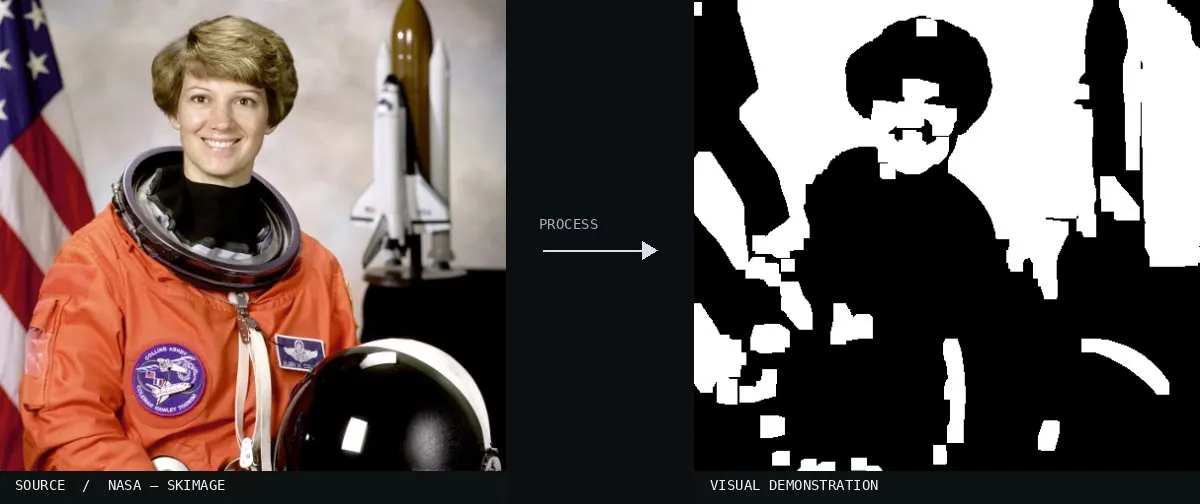
Real-world algorithm demonstration, applied to a NASA portrait.Image: NASA / Eileen Collins · scikit-image (public domain)View source ↗
Prompt
Apply Morphological Opening to remove tiny bright flecks, narrow luminous protrusions, and isolated light specks. Slightly simplify the outlines of bright regions while leaving larger light masses intact. Keep dark surroundings, existing colors, and broad lighting relationships stable without general blur. Preserve the original subject and composition.
[Erosion1followed by dilation2][removes light-colored small particles].
Try it out
Test different structural elements.
Classification
Calculated image processing result.
Further examples · 9 images
02MorphologicalOpeningA diagram displays blue rectangles before and after processing with a circular structuring element. It demonstrates how opening removes narrow features smaller than the disk while rounding the corners of remaining larger shapes.MartinPfeiffer · Public domain · Wikimedia Commons03Kastanie erosion dilatation openingA series of black shapes showing the progressive removal of thin spikes. It illustrates how opening removes small foreground structures that do not fit the structuring element while preserving the main object body.Staledel · CC BY-SA 4.0 · Wikimedia Commons04Square MorphologicalA comparative grid shows erosion, dilation, and opening operations on binary shapes. The bottom-left panel demonstrates morphological opening by removing a small white noise particle while preserving the larger square's dimensions.Thomas.haslwanter · CC BY-SA 3.0 · Wikimedia Commons05Illustration ouvertureA pixel grid demonstrates the effect on binary shapes. Small gray blocks representing noise are removed through erosion, while the primary black shapes are reconstructed during the subsequent dilation phase.Etienne Decenciere · CC BY-SA 3.0 · Wikimedia Commons06Morphological Opening, applied to “Joukowsky-Pressure-Shock-01”Bright reflections on the metallic object disappear while the overall structure remains. The rectangle kernel creates blocky dark regions, and the diagonal kernel produces slanted dark erasures.CEphoto, Uwe Aranas (photo); processed for the Atlas · CC BY-SA 3.0 · Wikimedia Commons07Morphological Opening, applied to “Chandelier of the nineteenth century in the Museo di Capodimonte (Napoli)”The thin spokes and intricate patterns of the chandelier are removed as small light elements. Large light-colored ceiling panels are preserved but reshaped by the rectangular and diagonal structural elements.Livioandronico2013 (photo); processed for the Atlas · CC BY-SA 4.0 · Wikimedia Commons08Morphological Opening, applied to “Chrysantheme rot tautropfen -20191024-RM-102058”Bright dew drops on the red flower petals are eliminated through erosion. The following dilation restores the petal shapes, though they take on the geometry of the specific kernels used.Ermell (photo); processed for the Atlas · CC BY-SA 4.0 · Wikimedia Commons09Morphological Opening, applied to “Ross Bridge”Bright clouds and water highlights in the landscape are removed by the operation. The diagonal kernel results in slanted artifacts across the bridge and river, while the rectangular kernel creates square-shaped gaps.JJ Harrison (https://www.jjharrison.com.au/) (photo); processed for the Atlas · CC BY-SA 3.0 · Wikimedia Commons


.jpg)

