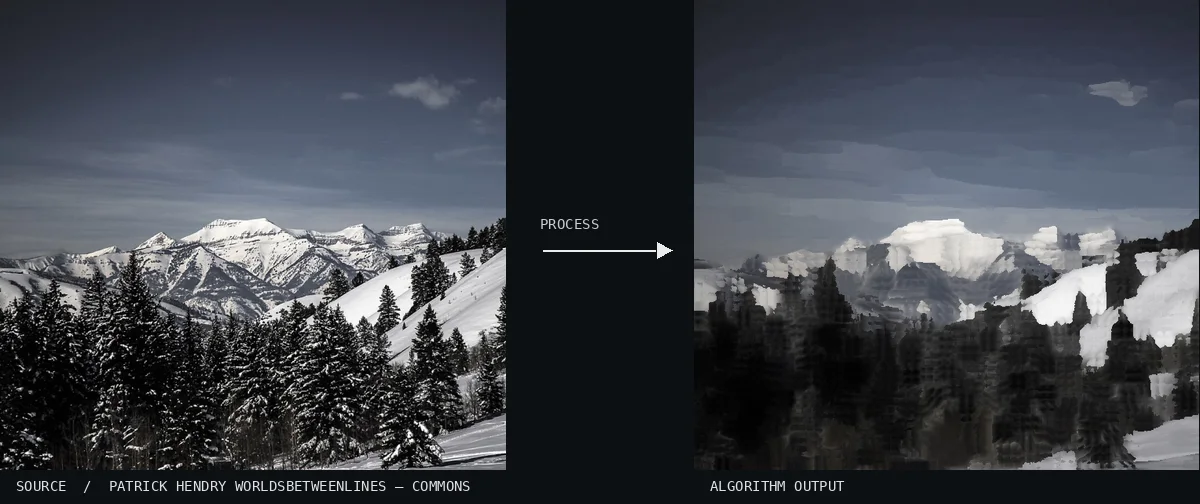
Atlas demonstration: the free source photo and the computed Kuwahara Filter. A wide mountain range is captured under a moody, overcast sky with dark peaks in the foreground. The simplification of the snow-covered slopes into blocky, high-contrast patches demonstrates the oil-painting aesthetic perfectly.Image: Patrick Hendry worldsbetweenlines · CC0 (via Wikimedia Commons), processed for the AtlasView source ↗
Prompt
Apply a Kuwahara Filter effect, replacing fine photographic texture with irregular, flat blocks of averaged color. Create a painterly mosaic of smooth patches with angular transitions, simplified shading, and clearly retained object boundaries. Reduce grain while preserving prominent contours and recognizable facial features. Keep the original subject and composition.
The output looks like astylized, painterly image where [flat blocks of color]replace fine textures1while edges remain sharp.
Principle
The algorithm divides the area around each pixel into [four overlapping regions]and calculates their [color variance2]. It then assigns the pixel the average color of the region with the lowest variance.
Try it out
Increase the filter size to see the image transform from mildly smoothed to heavily abstracted brushstrokes.
Classification
Calculated image processing result.
Further examples · 9 images
02Kuwahara Filter, applied to “Man smoking in Kuta (Unsplash)”A man stands in profile amidst a crowded night scene with warm artificial lighting hitting his face. The transformation of background lights into smooth, circular color shapes while preserving the sharp silhouette of the subject is a classic application of the filter.Alit Pramesta alitpramesta (photo); processed for the Atlas · CC0 · Wikimedia Commons03Kuwahara Filter, applied to “Bird on branch (Unsplash)”A small bird is perched on a branch, surrounded by lush green foliage and soft sunlight. The textures of the feathers and leaves are smoothed into elegant, painterly strokes while maintaining clear boundaries between the subject and the background.Pritiranjan Maharana pritiranjan101 (photo); processed for the Atlas · CC0 · Wikimedia Commons04Kuwahara Filter, applied to “Road trip interior (Unsplash)”A scenic landscape is viewed from the interior of a vehicle moving toward distant mountains. The sky and road are rendered in smooth, flat planes of color, while the mountain peaks retain their sharp, jagged silhouettes.kaluci kaluci (photo); processed for the Atlas · CC0 · Wikimedia Commons05Kuwahara Filter, applied to “Child with a lantern (Unsplash)”A person in a heavy coat holds a glowing white lantern against a dark, wooden slatted wall. The light from the lantern and the fallen leaves on the ground are transformed into distinct, painterly patches of orange and white.Daiga Ellaby daiga_ellaby (photo); processed for the Atlas · CC0 · Wikimedia Commons06Kuwahara Filter, applied to “Colorful flowers in bloom (Unsplash)”A dense cluster of white daisies with yellow centers is surrounded by green foliage and smaller purple flowers. The algorithm has smoothed the flower petals into clean, uniform surfaces while preserving the distinct boundaries of every leaf.Rodion Kutsaev frostroomhead (photo); processed for the Atlas · CC0 · Wikimedia Commons07Kuwahara Filter, applied to “Flowers - 2 (Unsplash)”Pink gerbera daisies and delicate red filler flowers are arranged in a clear glass vase against a soft mint background. The petals are broken down into a series of stepped color levels, creating a mosaic effect that mimics traditional oil painting.Maarten Deckers maartendeckers (photo); processed for the Atlas · CC0 · Wikimedia Commons08Kuwahara Filter, applied to “Landscape from Busan Tower (Unsplash)”An aerial view overlooks a dense urban environment filled with various apartment buildings and colorful rooftops. The effect abstracts the complex architecture into a mosaic of rectangular color fields, though the sheer density of detail makes the regions appear smaller.David Zhang crispgm (photo); processed for the Atlas · CC0 · Wikimedia Commons09Kuwahara Filter, applied to “Woman Sketch Man Portrait (Unsplash)”A monochrome scene depicts an artist seated before an easel, working on a portrait in a studio. The grayscale tones emphasize the flat, posterized regions created by the variance calculation, particularly in the highlights of the canvas and the artist's clothing.Clem Onojeghuo clemono2 (photo); processed for the Atlas · CC0 · Wikimedia Commons
.jpg)
.jpg)
.jpg)
.jpg)
.jpg)
.jpg)
.jpg)
.jpg)