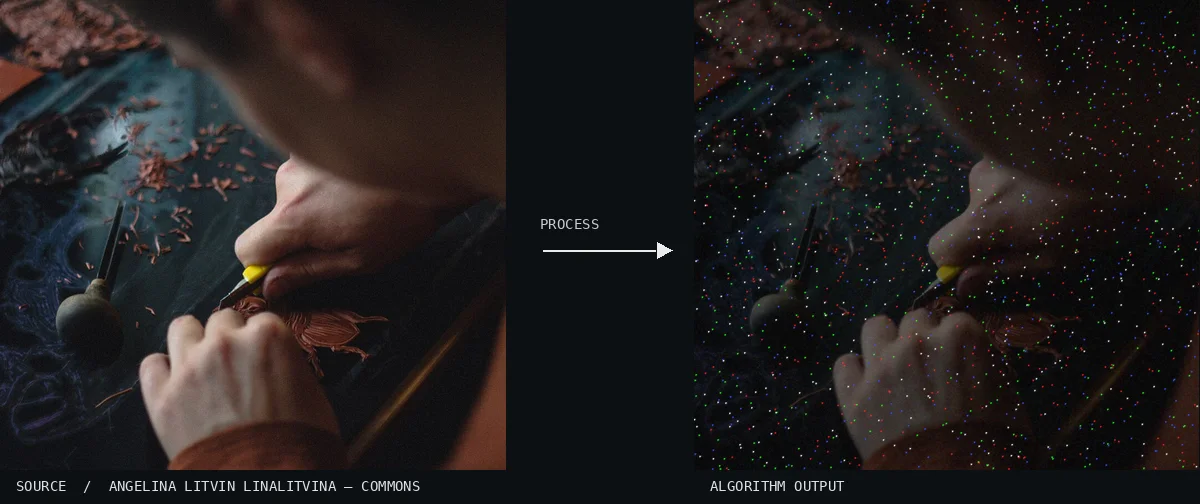
Atlas demonstration: the free source photo and the computed Hot Pixel Noise. A close-up view captures hands carefully carving a small object amidst wood shavings. A dense field of vibrant red, green, and blue pinpoints is scattered across the dark tones of the workbench.Image: Angelina Litvin linalitvina · CC0 (via Wikimedia Commons), processed for the AtlasView source ↗
Prompt
Apply Hot Pixel Noise, scattering sparse, sharply defined white, red, green, and blue pinpoints across the photograph. Make individual specks unnaturally bright and especially noticeable in dark regions, without halos, broad grain, or changes to overall exposure and texture. Keep the original subject and composition.
Scattered [bright pinpoints]appear as [white or colored specks]against an otherwise intact photograph.
Principle
The algorithm selects sparse pixel locations and sets one or more [color channels1]to high values, simulating hot pixels2. It changes individual pixel values rather than brightening the whole image.
Try it out
Vary the speck density and check how strongly the points stand out in shadows.
Classification
Calculated image processing result.
Further examples · 9 images
02Hot Pixel Noise, applied to “Cat (Unsplash) (2017; cropped 2023)”A curious gray kitten looks directly at the camera with wide, amber eyes. Tiny, saturated specks of color are distributed evenly over the subject and the neutral background.Marko Blažević kerber (photo); processed for the Atlas · CC0 · Wikimedia Commons03Hot Pixel Noise, applied to “Camera Under A Bridge (Unsplash)”A camera operator stands on a city street at night, framed by the silhouette of heavy equipment. The dark shadows of the clothing and machinery are filled with sharp, multicolored light artifacts.Jakob Owens jakobowens1 (photo); processed for the Atlas · CC0 · Wikimedia Commons04Hot Pixel Noise, applied to “Bryce Canyon National Park horizon (Unsplash)”Towering rock formations rise against a dramatic sky filled with light clouds. A consistent pattern of bright, isolated pixels is overlaid across the entire landscape.Drew Hays drew_hays (photo); processed for the Atlas · CC0 · Wikimedia Commons05Hot Pixel Noise, applied to “Furry alley cat (Unsplash)”A fluffy cat sits tucked away in a dark doorway next to a weathered wall. The deep shadows of the interior are punctuated by a multitude of individual colored dots.Mukesh Jain hocus_phocus (photo); processed for the Atlas · CC0 · Wikimedia Commons06Hot Pixel Noise, applied to “Elderly street vendor (Unsplash)”A shopkeeper sits quietly inside a market stall filled with various goods and hanging signs. The dim lighting of the shop is disrupted by thousands of bright, single-pixel color anomalies.Jose Murillo jcmu (photo); processed for the Atlas · CC0 · Wikimedia Commons07Hot Pixel Noise, applied to “Banjo player sunset (Unsplash)”A silhouette of a person wearing a wide-brimmed hat stands against the glow of a setting sun. Countless multicolored pinpoints of red, green, and blue light are scattered across the dark figure and sky, mimicking sensor defects.Priscilla Du Preez artographybyp (photo); processed for the Atlas · CC0 · Wikimedia Commons08Hot Pixel Noise, applied to “Province of Como, Italy (Unsplash QDPFWFCHes4)”A young man with headphones is captured in profile against a soft, blurred outdoor background. Sharp green and red specks pepper the frame, appearing as bright static over his face and hair.Alex Blăjan alexb (photo); processed for the Atlas · CC0 · Wikimedia Commons09Hot Pixel Noise, applied to “BwTreeLinedRoad(byPavelVoinov)”A dark, symmetrical tunnel of trees lines a road that recedes into a hazy horizon. The dark foliage is densely populated with tiny, isolated bright pixels that stand out against the deep shadows.Pavel Voinov (photo); processed for the Atlas · CC0 · Wikimedia Commons
_(2017;_cropped_2023).jpg)
.jpg)
.jpg)
.jpg)
.jpg)
.jpg)
.jpg)
.jpg)