M 161 / 18307 Filters & Motionalgorithm output

Classical Image Inpainting

filtering, restoration & motion
Typeface · Inconsolata

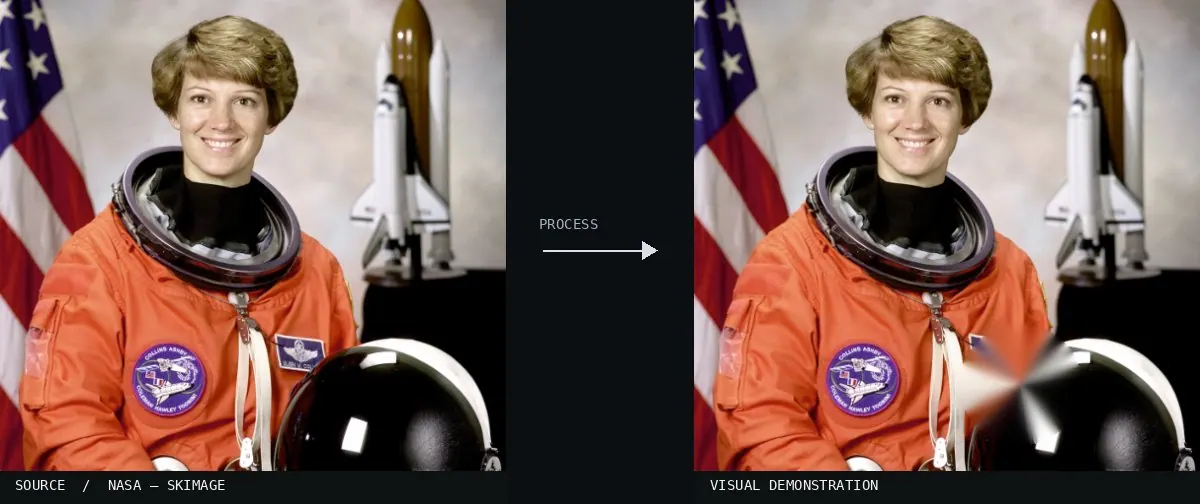
Real-world algorithm demonstration, applied to a NASA portrait.
Real-world algorithm demonstration, applied to a NASA portrait.Image: NASA / Eileen Collins · scikit-image (public domain)View source ↗

Prompt

Apply Classical Image Inpainting to a small damaged or distracting background area, reconstructing it from nearby colors, textures, and continuing contours. Blend the repair seamlessly, allowing slight local softness without introducing new objects, conspicuous seams, or altered lighting. Leave everything outside the repair unchanged. Keep the original subject and composition.

Identify

A selected area is reconstructed from its surroundings.

Principle

OpenCV1 inpainting transfers structures and colors into the mask2.

Try it out

Remove a small object.

Classification

Calculated image processing result.

Further examples · 8 images

Schéma PatchMatch
02 Schéma PatchMatchA technical diagram shows color-coded patches being mapped into a gray masked region. It illustrates the logic of patch-based texture synthesis used in algorithms like PatchMatch for digital image reconstruction.Prométhée33 · CC BY-SA 3.0 · Wikimedia Commons
PatchMatch
03 PatchMatchA side-by-side comparison shows the removal of specific flower elements from a field. The algorithm reconstructs the missing area by matching and copying patches from the surrounding texture to maintain visual continuity.Erickraz · Public domain · Wikimedia Commons
Classical Image Inpainting, applied to “Coloured, textured craft card edit”
04 Classical Image Inpainting, applied to “Coloured, textured craft card edit”Magenta markings over textured craft cards are removed in the right panel. The algorithm fills these areas by sampling neighboring colors and textures from the overlapping card edges.MichaelMaggs derivative work: Alvesgaspar (talk) (photo); processed for the Atlas · CC BY-SA 3.0 · Wikimedia Commons
Classical Image Inpainting, applied to “Love padlocks on the Butchers' Bridge (Ljubljana) (cropped)”
05 Classical Image Inpainting, applied to “Love padlocks on the Butchers' Bridge (Ljubljana) (cropped)”Large text and scattered artifacts over a heart-shaped padlock are eliminated. The inpainted result reconstructs the padlock's surface and the steel cable by propagating adjacent pixels into the mask.Petar Milošević (photo); processed for the Atlas · CC BY-SA 4.0 · Wikimedia Commons
Classical Image Inpainting, applied to “Gewone smeerwortel (Symphytum officinale) 04”
06 Classical Image Inpainting, applied to “Gewone smeerwortel (Symphytum officinale) 04”A purple defect mask covering a plant is removed through digital reconstruction. The surrounding green background and white flower petal structures are interpolated to fill the missing regions.Dominicus Johannes Bergsma (photo); processed for the Atlas · CC BY-SA 3.0 · Wikimedia Commons
Classical Image Inpainting, applied to “Bloemen van een meidoorn (Crataegus) 08-05-2022. (d.j.b)”
07 Classical Image Inpainting, applied to “Bloemen van een meidoorn (Crataegus) 08-05-2022. (d.j.b)”The image shows white hawthorn flowers against a dark background with digital damage. Classical inpainting replaces the magenta areas by extending the solid black background and floral textures.Dominicus Johannes Bergsma (photo); processed for the Atlas · CC BY-SA 4.0 · Wikimedia Commons
Classical Image Inpainting, applied to “Masashi Kokuen Kiritsuke Petty 135mm (2026)-104A7479”
08 Classical Image Inpainting, applied to “Masashi Kokuen Kiritsuke Petty 135mm (2026)-104A7479”A knife resting on a rocky surface is cleared of magenta digital artifacts. The algorithm uses the complex stone texture and knife blade colors to patch the damaged pixels.Frank Schulenburg (photo); processed for the Atlas · CC BY-SA 4.0 · Wikimedia Commons