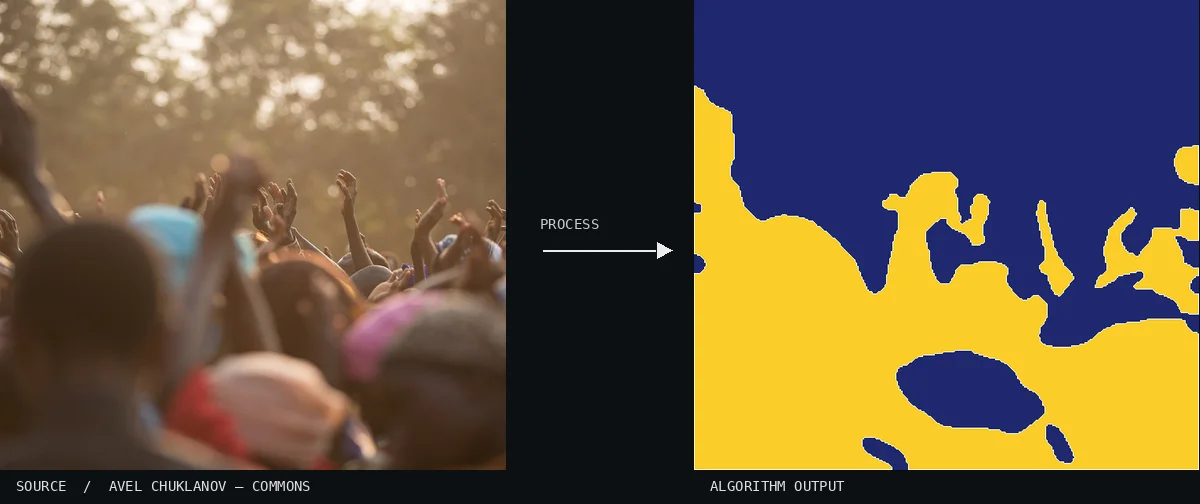
Atlas demonstration: the free source photo and the computed Chan–Vese Level Set. This image depicts a person with their hands raised against a complex background. The algorithm has successfully reduced the figure to a smooth, two-tone yellow mass, ignoring small details in favor of a clean boundary.Image: Avel Chuklanov · CC0 (via Wikimedia Commons), processed for the AtlasView source ↗
Prompt
Apply a Chan–Vese Level Set effect, reducing the photograph to a clean black-and-white binary mask with two uniform regions. Follow broad intensity-defined shapes, smooth their boundaries, and suppress fine texture, tiny holes, and noisy edges. Avoid gradients or decorative outlines. Keep the original subject and composition.
A[binary mask]divides the photo into [two regions], often following broad shapes rather than fine texture.
Principle
The algorithm evolves alevel set1to reduce deviations from each region’s mean intensity2while penalizing [boundary length]. This favors uniform regions without requiring strong edges.
Try it out
Vary boundary smoothing and watch small details disappear or survive.
Classification
Calculated image processing result.
Further examples · 9 images
02Chan–Vese Level Set, applied to “Germany (Unsplash 4z4ztWP7WPs)”A close-up of a crab is rendered through a stark binary mask. The resulting shapes are highly stylized, capturing the broad curvature of the shell and claws while eliminating internal texture.Julia Raasch julesrsh (photo); processed for the Atlas · CC0 · Wikimedia Commons03Chan–Vese Level Set, applied to “Main entrance.”Architectural columns and beams are viewed from a low angle against the sky. The computational model has effectively grouped the structures into a continuous yellow form, ignoring shadows to maintain a uniform region.Elwell, Newton W (photo); processed for the Atlas · Public domain · Wikimedia Commons04Chan–Vese Level Set, applied to “Helsinki Rooftops (Unsplash)”This image depicts a sprawling urban skyline at dusk. The algorithm simplifies the cityscape into two dominant intensity regions, grouping various buildings and sky into solid yellow and blue blocks.Rucksack Magazine rucksackmag (photo); processed for the Atlas · CC0 · Wikimedia Commons05Chan–Vese Level Set, applied to “Children playing by the map (Unsplash)”The photo captures an expansive, rocky desert landscape. The binary mask effectively isolates the lighter sunlit ground from the darker shadows and background features.Jake Hawkes jake_hawkes (photo); processed for the Atlas · CC0 · Wikimedia Commons06Chan–Vese Level Set, applied to “Welder in a workshop (Unsplash)”Several large stones are scattered across a dark, uniform surface. The effect creates smooth, rounded boundaries that isolate the stones' highlights from the surrounding shadows.Uğur Gürcüoğlu sharkdesignstudio (photo); processed for the Atlas · CC0 · Wikimedia Commons07Chan–Vese Level Set, applied to “Sightseeing on a boat (Unsplash)”A single piece of fruit rests centrally on a flat table. The level set evolution creates a clean, blob-like representation that ignores surface texture in favor of the fruit's overall shape.Matthew Henry matthewhenry (photo); processed for the Atlas · CC0 · Wikimedia Commons08Chan–Vese Level Set, applied to “Green and Red (Unsplash)”This image shows a small, isolated object placed against a wide, dark background. The processing results in a simplified, geometric island of color that captures the core intensity of the subject.Matt Alaniz mattalaniz (photo); processed for the Atlas · CC0 · Wikimedia Commons09Chan–Vese Level Set, applied to “Atoll. (Unsplash)”A minimalist horizon is shown where a yellow landscape meets a dark blue sky. The level set evolution has created a nearly straight, simplified partition between the two primary light and dark regions.Syd Sujuaan sydsujuaan (photo); processed for the Atlas · CC0 · Wikimedia Commons
.jpg)

.jpg)
.jpg)
.jpg)
.jpg)
.jpg)
.jpg)