Ambient Occlusion
Ambient occlusion / AO. 2000s: widespread in rendering and subsequently real-time graphics.
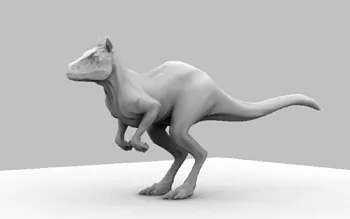
Prompt
Apply an ambient occlusion effect with soft, localized darkening in creases, recesses, narrow gaps, and points where surfaces touch. Build subtle neutral-toned contact shadows that fade smoothly outward, strengthening volume and grounding objects without black outlines, altered materials, or new directional lighting. Keep the original subject and composition.
Identify
Corners, gaps and contact zones receive a soft, dark densification.
Principle
Fewer free surrounding directions mean less ambient lighting1.
Example
GPU Gems: Ambient Occlusion Comparison.
Try it out
Compare two touching objects with and without AO2.
Background
In 2004, GPU Gems documented ambient occlusion as a practical complement to material and lighting models. For each surface point, it estimates what proportion of its surroundings is obscured by geometry. This makes shape relationships and contacts more legible, even under simple lighting conditions. Later real-time versions calculate approximations from screen data or geometry. The 2000s mark this documented phase of widespread adoption, not an exclusive point of invention.
Distinction
AO is a visibility approximation for ambient light, not a complete global illumination. Excessive intensity produces dirty edges and dark halos.
Aftermath
A subtle contact shadow can explain spatial relationships more clearly than more texture.
Further examples · 9 images


Question
Why is AO not a substitute for a directional lamp?
Show possible answer +Hide answer −
It describes the obscuring of the surroundings. A lamp, on the other hand, defines a specific direction of light with its own visibility and shadow.