M 021 / 18301 Edge & Featuresalgorithm output

Histogram Equalization

edge & feature detection
Typeface · Red Hat Mono

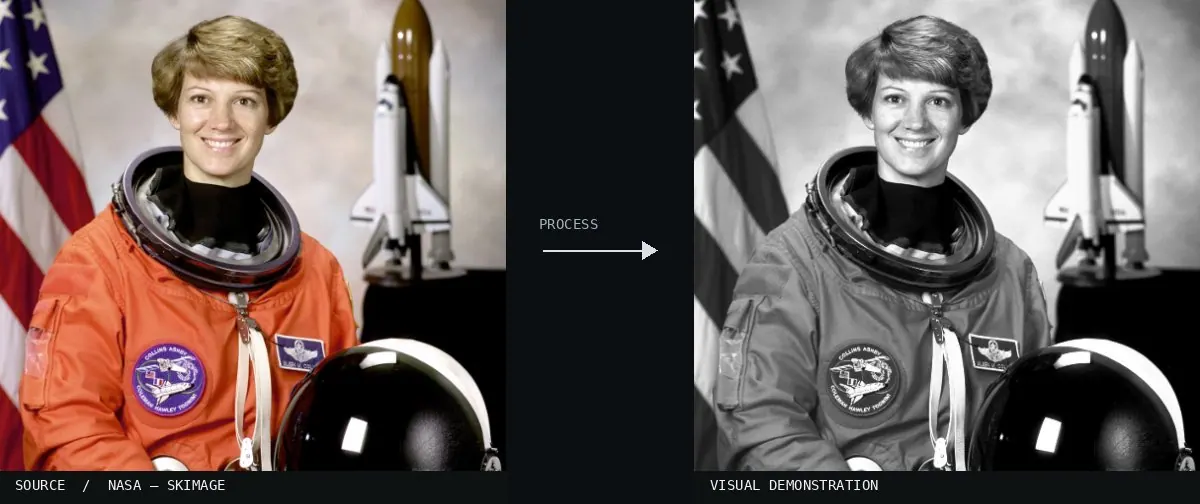
Real-world algorithm demonstration, applied to a NASA portrait.
Real-world algorithm demonstration, applied to a NASA portrait.Image: NASA / Eileen Collins · scikit-image (public domain)View source ↗

Prompt

Apply Histogram Equalization to redistribute brightness across the entire image, expanding compressed tones into deeper blacks, brighter whites, and stronger midtone separation. Reveal previously muted textures with a distinctly global contrast shift, allowing some grain emphasis while retaining recognizable colors. Keep the original subject and composition.

Identify

Contrast is redistributed1 across the entire image.

Principle

The global brightness histogram2 is redistributed.

Try it out

Compare the skin areas.

Classification

Calculated image processing result.

Further examples · 7 images

Histogram equalization
02 Histogram equalizationA comparison panel shows a landscape alongside its narrow and expanded histograms. It illustrates the effect by shifting a compressed, low-contrast peak into a broader distribution that utilizes the full range of brightness levels.Phillip Capper · CC0 · Wikimedia Commons
Histogram Equalization, applied to “Portrait Nepalese hindu priest in Kathmandu-070A2930”
03 Histogram Equalization, applied to “Portrait Nepalese hindu priest in Kathmandu-070A2930”A portrait of a Hindu priest shows increased skin texture and color saturation on the right. The equalization stretches the histogram, darkening midtones and enhancing the red pigment on his forehead.Bijay Chaurasia (photo); processed for the Atlas · CC BY-SA 4.0 · Wikimedia Commons
Histogram Equalization, applied to “Crate maker”
04 Histogram Equalization, applied to “Crate maker”The crate maker is seated in a dimly lit workshop. The right side displays expanded dynamic range, making the shadow areas deeper and the highlights on the wood strips more prominent.Summering2018 (photo); processed for the Atlas · CC BY-SA 4.0 · Wikimedia Commons
Histogram Equalization, applied to “A man carries a huge hammerhead through the streets of Mogadishu”
05 Histogram Equalization, applied to “A man carries a huge hammerhead through the streets of Mogadishu”A man carries a hammerhead shark through a sunlit street. The processed right half shows higher local contrast in the debris and sky, resulting in more defined shadows and bright surfaces.Marco Gualazzini (photo); processed for the Atlas · CC BY-SA 4.0 · Wikimedia Commons
Histogram Equalization, applied to “Brescia Orologio Piazza Loggia”
06 Histogram Equalization, applied to “Brescia Orologio Piazza Loggia”The astronomical clock in Brescia appears with bolder colors and deeper shadows on the right. Equalization redistributes the tones to accentuate the gold details against the blue face and stone frame.This Photo was taken by Wolfgang Moroder. Feel free to use my photos, but please mention me as th (photo); processed for the Atlas · CC BY-SA 3.0 · Wikimedia Commons
Histogram Equalization, applied to “2013 Cogden Bridge”
07 Histogram Equalization, applied to “2013 Cogden Bridge”The Cogden Bridge landscape features more intense sky blues and darker foliage on the right. The global contrast adjustment spreads the intensity values to emphasize the distinction between clouds and hills.Kreuzschnabel (photo); processed for the Atlas · CC BY-SA 3.0 · Wikimedia Commons