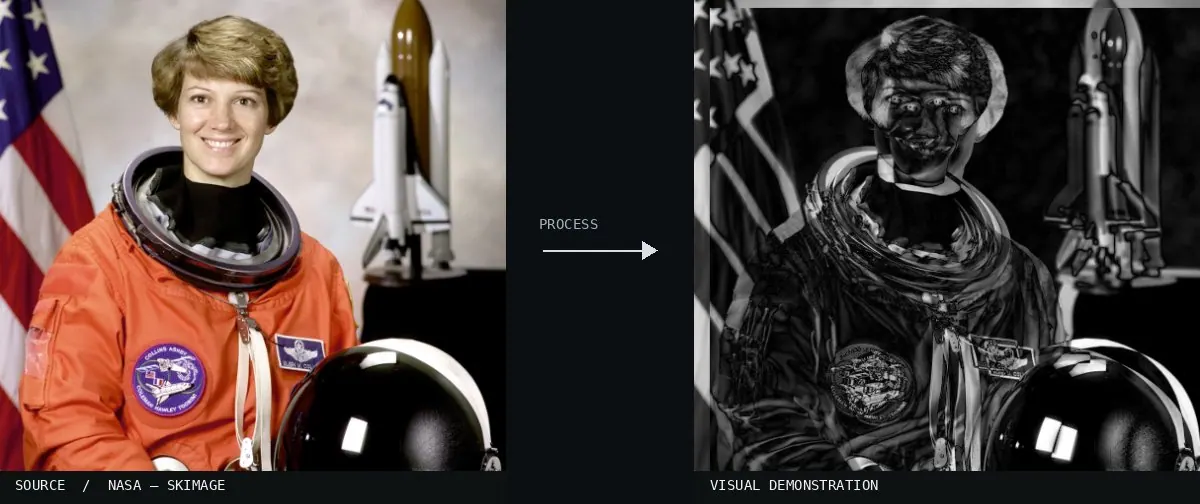
Real-world algorithm demonstration, applied to a NASA portrait.Image: NASA / Eileen Collins · scikit-image (public domain)View source ↗
Prompt
Apply Frame Differencing to simulate subtracting two slightly offset copies of the photograph. Darken unchanged areas toward black and illuminate displaced boundaries as thin, paired white or colored contours. Emphasize shifted silhouettes while keeping a faint underlying scene visible for recognition. Preserve the original subject and composition.
02Motion compensation example-differenceA dark image displays illuminated outlines of complex structures and a human figure. It illustrates frame differencing by showing the high residual error between two raw frames where many pixels have changed position.(c) copyright 2006, Blender Foundation / Netherlands Media Art Institute / www.elephantsdream.org · CC BY 2.5 · Wikimedia Commons03Overview of the creation of motiongramsThe top left panel shows a 'Motion image' created through frame subtraction, isolating moving objects. This data is then collapsed into 1-pixel wide rows and columns to generate the motiongram visualizations.Alexarje · CC BY-SA 3.0 · Wikimedia Commons04SwisTrack BackgroundSubtractionGrayBright moving objects are visible against a black background. The static environment is removed through subtraction, leaving only the pixels where luminance values changed between frames.Produit · Public domain · Wikimedia Commons05AI illustration: A glowing green silhouette of a walking figure is displayed on a dark bacA glowing green silhouette of a walking figure is displayed on a dark background. The bright outlines represent the calculated pixel difference between movement frames, isolating only the changing edges.Illustration generated for the Atlas (AI)06AI illustration: A split screen shows a person and a mask of their moving handA split screen shows a person and a mask of their moving hand. The right side displays only the pixels that changed between frames, successfully isolating the motion against a black background.Illustration generated for the Atlas (AI)07AI illustration: A glowing outline represents a pedestrian moving through a static environA glowing outline represents a pedestrian moving through a static environment. The luminous edges result from subtracting consecutive frames, highlighting only the areas where the figure's position has changed against the dark background.Illustration generated for the Atlas (AI)